
Google Drive Folder Size Checker
by Drive Explorer
Check the Size of your Google Drive Folders
Select any folder to instantly calculate total size, inspect subfolder allocations, and count files.
Why Google Drive Doesn't Show Folder Sizes
Folders are just metadata in Google Drive
Unlike traditional file systems, Google Drive treats folders as special files with a "folder" type. They don't actually contain files in the conventional sense.
Files reference their parent folders
Each file in Google Drive has a "parent" property that points to its containing folder. This parent-child relationship is stored as metadata on the file itself, not within the folder.
This architecture makes calculating folder sizes computationally expensive, which is why Google Drive doesn't display them by default. Our tool iterates through all files to calculate the total size for you.
Step-by-Step Tutorial
How to Check Folder Size in Google Drive
Follow these three simple steps to calculate the exact size of any Google Drive folder and export your report — without installing desktop software or syncing files locally.
Select Any Folder
Click "Select Folder" above to open the secure Google Drive picker. Choose any folder from My Drive, Shared Drives, or Shared with me.
Run Instant In-Browser Scan
Our scanner iterates through all files and nested subdirectories in real-time. All calculations run strictly in your browser for privacy.
View Breakdown, Export CSV & Sheets
Get an immediate breakdown of total folder size, file counts, and subfolder allocations. Download the report as CSV or push directly into Google Sheets with one click.
How to See Google Drive Folder Sizes Without Downloading
Google Drive does not display folder sizes natively. Here is how the three common methods compare for calculating Google Drive folder sizes without wasting disk space.
1. In-Browser Scanner
Drive Explorer Tool
Uses Google Drive API to iterate file metadata recursively in your browser session without downloading any files to your disk.
Advantages
Zero local storage or disk space used
Works instantly on mobile & desktop browsers
Recursive breakdown for deeply nested folders
Direct export to CSV and Google Sheets
Limitations
Requires active internet connection
2. Download & Zip via Drive
Native Drive Web Menu
Right-clicking a folder in Google Drive and selecting "Download" forces Google to zip and download all files to your hard drive.
Advantages
Built into Google Drive interface
Limitations
Consumes gigabytes of local hard drive storage
Slow zip compression that frequently times out
Splits large folders into multiple disjointed archives
3. Google Drive for Desktop
Local Sync Client
Installing Google Drive desktop app mounts a virtual drive on your computer, allowing you to inspect properties in Windows Explorer or macOS Finder.
Advantages
View sizes in native OS file explorer
Limitations
Requires downloading and installing software
Can take hours to sync cache for large hierarchies
May freeze Finder/Explorer on 50,000+ files
What You'll See
After the scan completes, you get a full breakdown of your folder's storage — sorted by size so the biggest space hogs are always at the top.
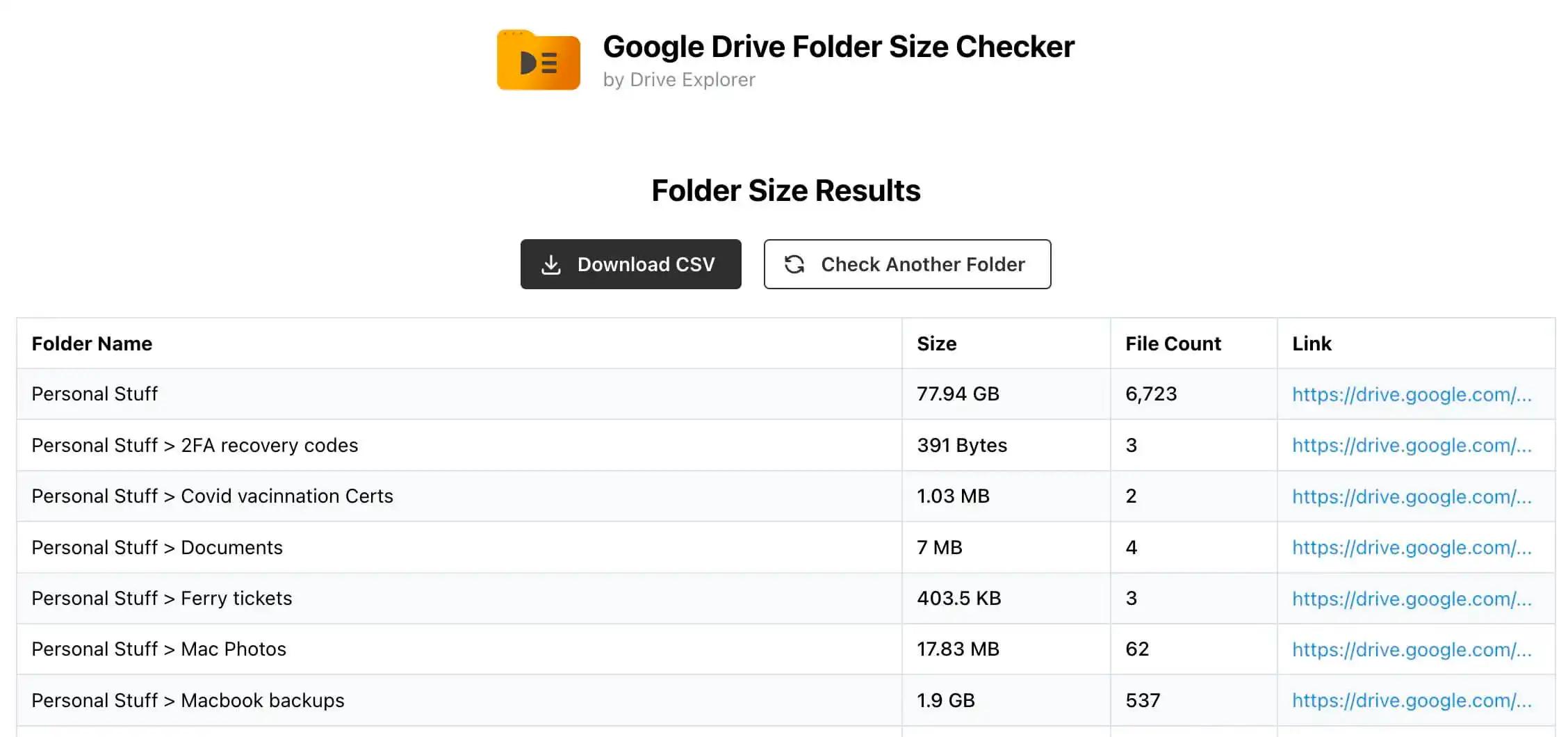
Recursive Google Drive Folder Size Checker
Google Drive folders can grow into deeply layered hierarchies — project archives, department drives, and client repositories often have subfolders nested five, ten, or more levels deep. Drive Explorer's folder size checker performs a full recursive audit, traversing every level of your folder tree to give you an accurate picture of where storage is being consumed.
Unlike manually clicking through folders in the Drive UI, the scanner automatically walks into every subfolder it finds — no matter how deeply nested — and aggregates file sizes all the way back up to the root. This means you can identify bloated subdirectories that would otherwise remain hidden in a tangle of nested folders.
Unlimited nesting depth — the scanner recurses until it reaches the bottom of every branch, no matter how deep.
Per-subfolder breakdown — see the size contribution of each child folder so you can pinpoint exactly what is consuming the most space.
Real-time progress — watch the scan advance folder by folder with live counters, so you always know how far along the audit is.
Storage Management Best Practices
How to Free Up Storage in Google Drive
Running out of Google Drive storage? Here are actionable strategies to audit, clean, and reclaim gigabytes of space.
Target Hidden Media Files
Video recordings, raw photos, and presentation decks take up 80%+ of Google Drive storage. Use folder size breakdown to identify media folders.
Locate Forgotten Zip Archives
Old system backups and downloaded archives often hide in deep subfolders. Find them by checking folder sizes recursively.
Empty the Google Drive Bin
Deleted files still consume your 15GB/account storage quota until you permanently empty your Drive Bin / Trash.
Shared Drive Storage Quotas
Shared Drives have file count limits (400,000 items max). Measuring folder sizes and file counts prevents hit-the-ceiling warnings.
Is it safe to use with Shared Drives and Work Accounts?
Drive Explorer is fully compatible with Google Workspace Shared Drives. All file metadata processing happens strictly in your browser and never touches third-party servers.
Google Verified
Drive Explorer undergoes recurring security audits by Google to maintain access to Drive APIs. We meet Google's strict security and privacy standards.
No Server Storage
Your file data never touches our servers. We don't collect, store, or transmit any of your Google Drive files or folder information.
Frontend Processing
All operations happen entirely in your browser. Your data stays on your device and is never sent to any external server.
Full Google Drive Audit & Management
Want to Audit Your Entire Google Drive to Google Sheets?
Checking single folder sizes is just the start. With Drive Explorer, export your complete Drive structure directly into Google Sheets with 30+ metadata fields, run recursive permission audits, and schedule auto-syncs.
Export to Sheets
Export folder sizes, direct download links, paths, and file types to Google Sheets.
Permission Audits
Audit editors, viewers, commenters, and public links across all nested folders.
Scheduled Refresh
Set hourly, daily, or weekly triggers to keep your file list spreadsheet up to date.
Google Drive Folder Size FAQs
Everything you need to know about checking Google Drive folder sizes.
To find more ways to check Google Drive folder size, check this article.
Explore More Google Drive Productivity Tools
Everything you need to audit, organize, migrate, and optimize your Google Workspace storage.