
Audit, Manage, and List Your Google Drive™
Stop clicking through hundreds of nested folders. Export complete file hierarchies, reveal hidden folder sizes, audit sharing permissions, and bulk-rename files with spreadsheet speed.
Managing Google Drive with the Standard UI is a Black Box
Google Drive is great for basic file storage, but terrible for auditing, bulk management, and security oversight. Without the right tools, you are flying blind.
Drive hides folder sizes & wastes your storage
Google Drive refuses to display folder sizes. When your 2TB limit fills up, you are forced to blindly dig through hundreds of nested directories trying to guess where the heavy files are hiding.
Hidden access permissions & risky shared links
Who can view or edit your confidential files? Checking permissions folder by folder is impossible. Old client shares and public link risks stay buried in your subfolders undetected.
Renaming and cataloging files takes days
Drive has zero bulk-editing power. Renaming hundreds of files, organizing assets, or creating inventory lists with download URLs requires endless, soul-crushing manual clicking.
The Solution: Drive Explorer + Google Sheets™
Google Sheets already has the superpowers you need: sorting, formulas, find-and-replace, and filters. Drive Explorer syncs your entire Drive hierarchy into Sheets so you can audit, organize, and automate everything in 1 click.
Everything You Need to Audit, Manage & Automate Google Drive
Designed for power users, project managers, and Workspace administrators who need total visibility and control over cloud files.
Export 30+ File Attributes to Sheets
Turn chaotic Google Drive folders into a clean, searchable spreadsheet. Export direct download links, full directory paths, file sizes, MIME types, creation dates, EXIF photo data, and video durations in one click.
- Direct download & PDF/DOCX conversion export links
- Image EXIF metadata (camera model, GPS coordinates, dimensions)
- Video file duration and dimensions
Recursive Permissions & Access Audit
Instantly audit who has access to your files across deeply nested folder structures. Export explicit columns for owners, editors, viewers, commenters, and general sharing status.
- Detailed viewer, editor, and commenter email lists
- Identify public links and external domain sharing
- Works recursively across subfolders and Shared Drives
In-Sheet File Renaming & Custom Tags
Manage Google Drive files with the speed and ergonomics of a spreadsheet. Bulk rename files or descriptions right from Google Sheets cells, and attach custom key-value metadata.
- Bulk rename files and update descriptions from Sheet rows
- Attach custom metadata key-value pairs for organization
- Filter files by date, MIME type, folder name, or size
Automated Scheduled Background Refresh
Keep your inventory spreadsheets always accurate without manual re-runs. Configure daily or hourly background triggers that synchronize Drive changes automatically.
- Periodic scheduled refresh (daily, weekly, or hourly)
- Automatically adds new files and flags modified items
- Zero manual intervention needed once scheduled
Loved by 1,000,000+ Google Workspace Users
See how IT managers, developers, publishers, and teams save countless hours organizing and auditing Google Drive.
4.6 / 5
(500+ Verified Marketplace Reviews)
"Worked perfectly for my 21,000 PDFs"
"It worked perfectly for my 21,000 PDFs , they deserve 10 stars."
Saro Paul
Verified Workspace User
"Saved me countless hours and headaches"
"Navigating shared folders was an intense headache... The results in Google Sheets can be searched, sorted, and include owner and edit status. I got so much done in just an hour!"
Greg Presnall
Verified Workspace User
"70,000+ files updated automatically"
"I have more than 70,000 files in Google Drive. With this application I can import the CSV directly into MySQL. Everything is updated automatically... It really is the best thing in the world."
Web Electronica School
Enterprise Admin
"Best tool for permissions overview"
"One of the best tools I've found so far to give an easy overview of permissions, access, etc for just a file, or folders."
Mike Blommer
Verified Workspace User
"Shortens and makes more accurate my review of articles"
"I edit a monthly newsletter for a senior living co-op with 35-50 submissions per month. I can embed a link to each article without toggling back and forth between Google Docs and sheets... We had one problem, the developer promptly fixed it."
Editor York Times (John)
Publication Editor
"Really great support and transparent billing"
"Only needed it for a short project and he reminded me in a few emails about how to cancel if needed. That's some pretty amazing support... by far the best for creating a catalog of files from Drive."
Aaron Marr
Verified Workspace User
Built for Every Google Drive Workflow
Whether you are freeing up personal storage, managing agency client deliverables, or securing an enterprise Google Workspace domain.
Freelancers & Content Creators
Storage Optimization & Media Management
“My 2TB Drive is full, but Google Drive won’t show me folder sizes to clean it up.”
Easily audit your personal or team Drive storage, pinpoint oversized folders, and extract technical metadata from media files.
- Calculate true recursive folder sizes that Drive hides
- Extract EXIF camera data, image dimensions & video duration
- Generate direct download links for instant sharing
Workspace Admins & IT Teams
Security Audits, Compliance & Offboarding
“We need to ensure former employees or contractors don’t retain access to company data.”
Run comprehensive security scans to uncover public links and audit viewer/editor permissions across nested Shared Drives.
- Export full recursive permission lists (viewers, editors, commenters)
- Instantly detect public links & external domain sharing
- Schedule auto-refresh to maintain audit-ready compliance logs
Agencies & Operations Teams
Client Deliverables & Bulk Organization
“Renaming 500 client assets and building folder hierarchies by hand wastes hours.”
Standardize deliverables and client onboarding with reusable template folders and spreadsheet-speed bulk operations.
- Bulk rename files and descriptions using Google Sheets formulas
- Duplicate complex client folder trees in 1 click
- Attach custom metadata tags to organize team workflows
Powerful Google Drive Tools Right Inside Google Sheets
Explore how Drive Explorer turns complex cloud file management into a simple, 1-click spreadsheet workflow.
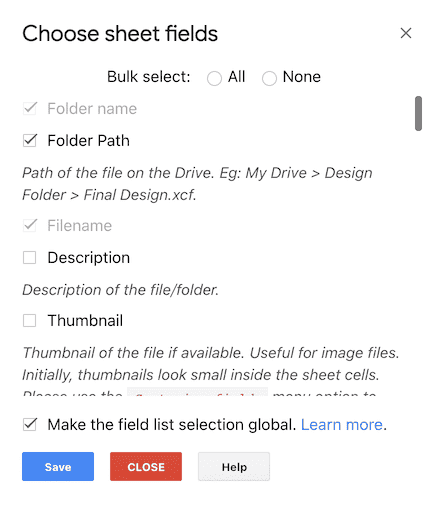
Extract deep file data Drive never shows you
Instantly export file sizes, recursive folder paths, MIME types, direct download links, video duration, and photo EXIF camera tags straight into Google Sheets.
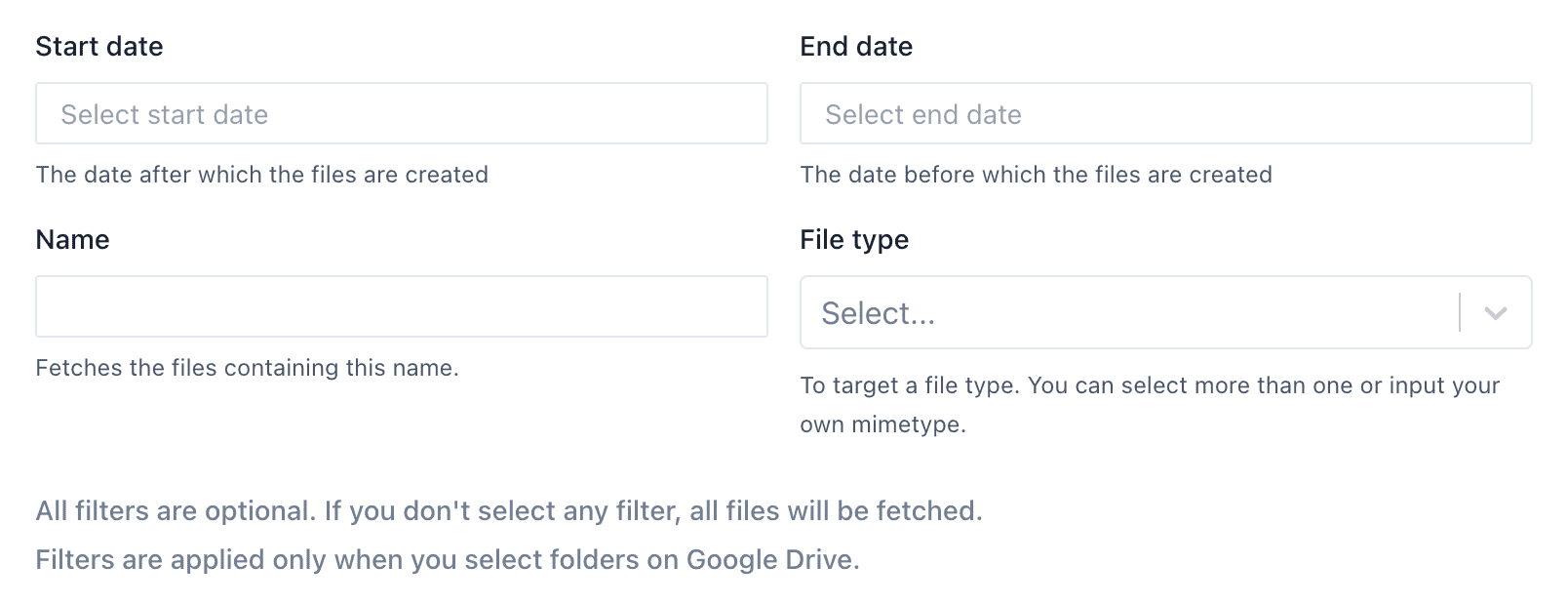
Filter precisely what you need before exporting
Never clutter your sheet with junk. Filter your Drive exports by file type, date ranges, folder hierarchy, or exact name keywords.
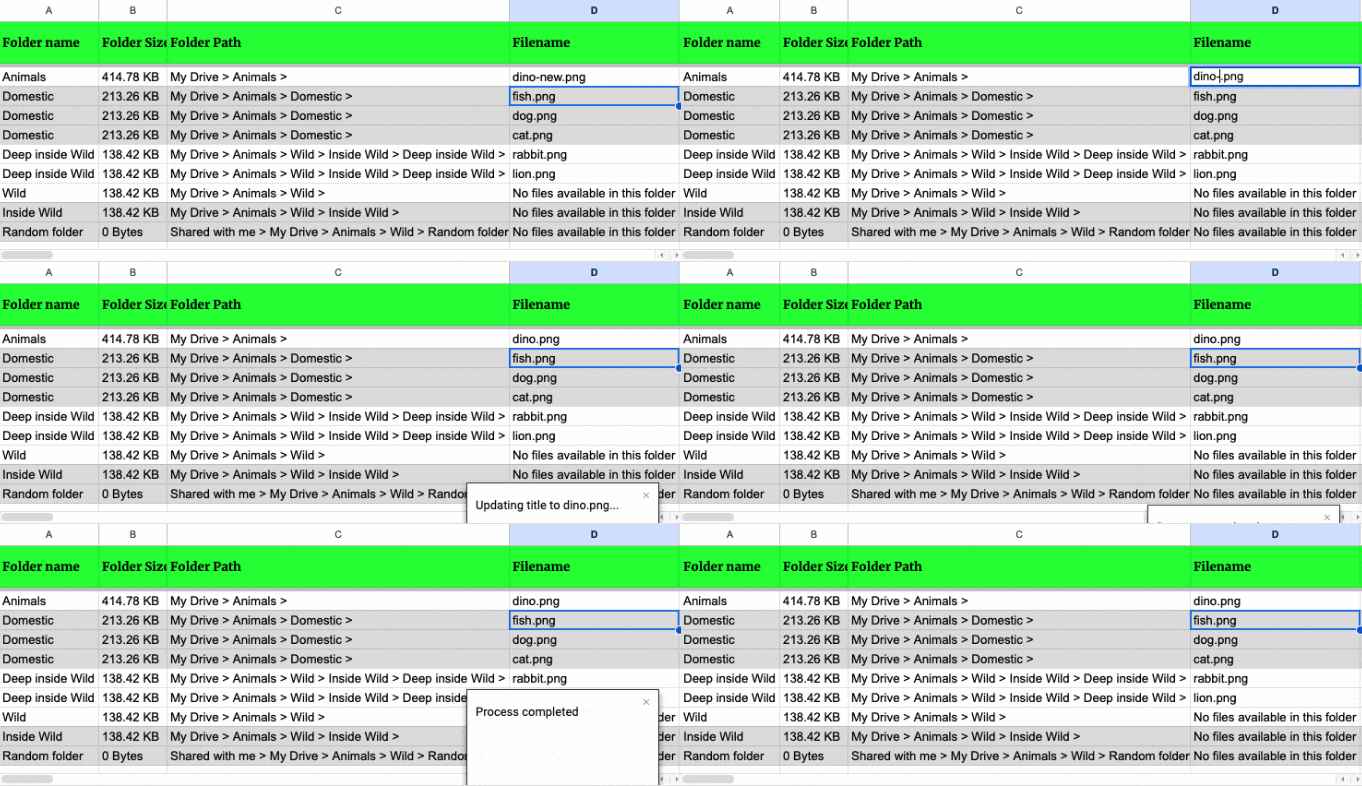
Bulk rename Drive files from Google Sheets cells
Stop clicking files one by one in Google Drive. Edit file names or descriptions in spreadsheet cells, leverage formulas or find-and-replace, and sync changes back to Drive in 1 click.
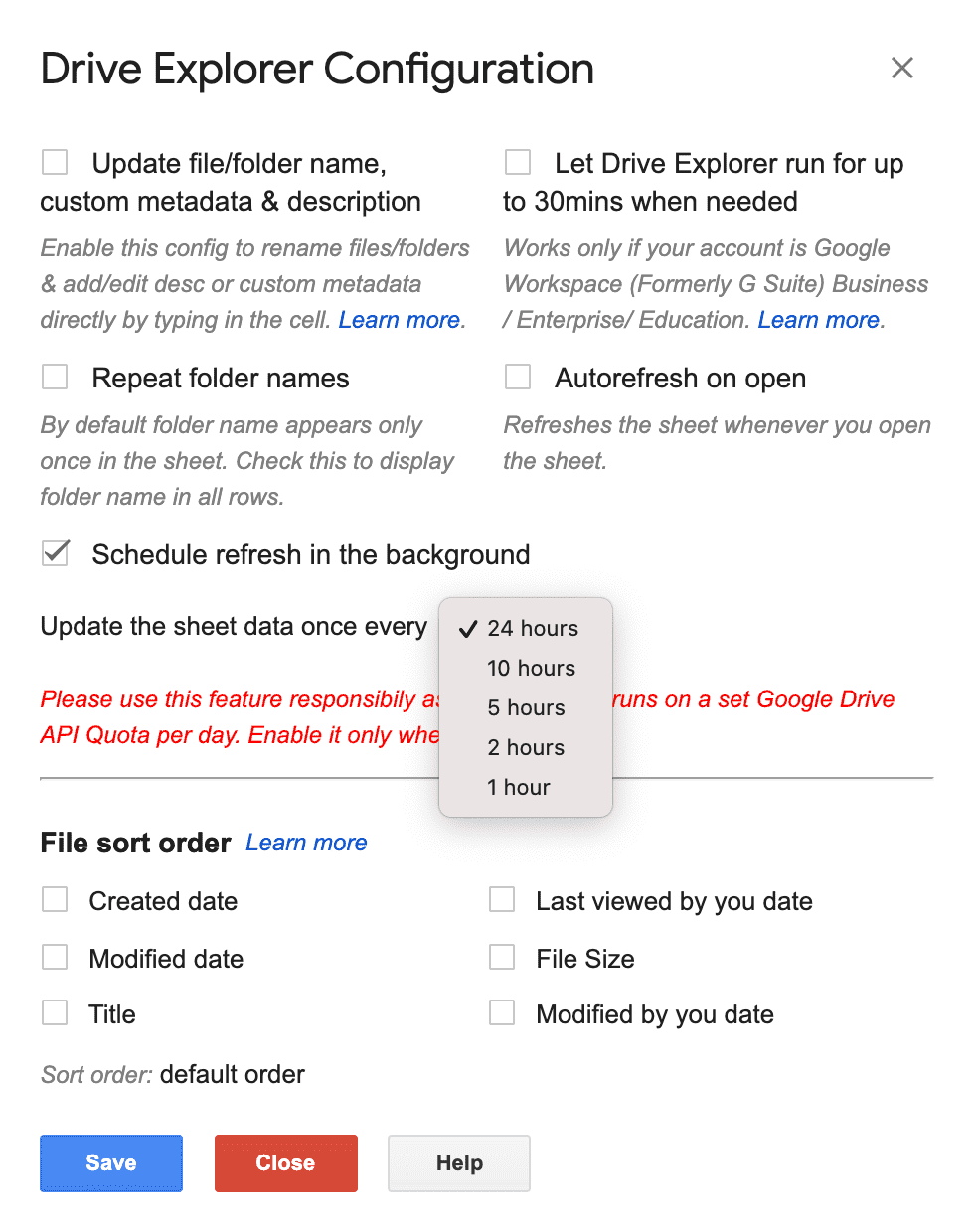
Keep inventory sheets fresh with scheduled auto-refresh
Set your Google Sheet to update automatically on a daily, weekly, or hourly schedule. Never run a manual export again—your sheets stay perpetually current.
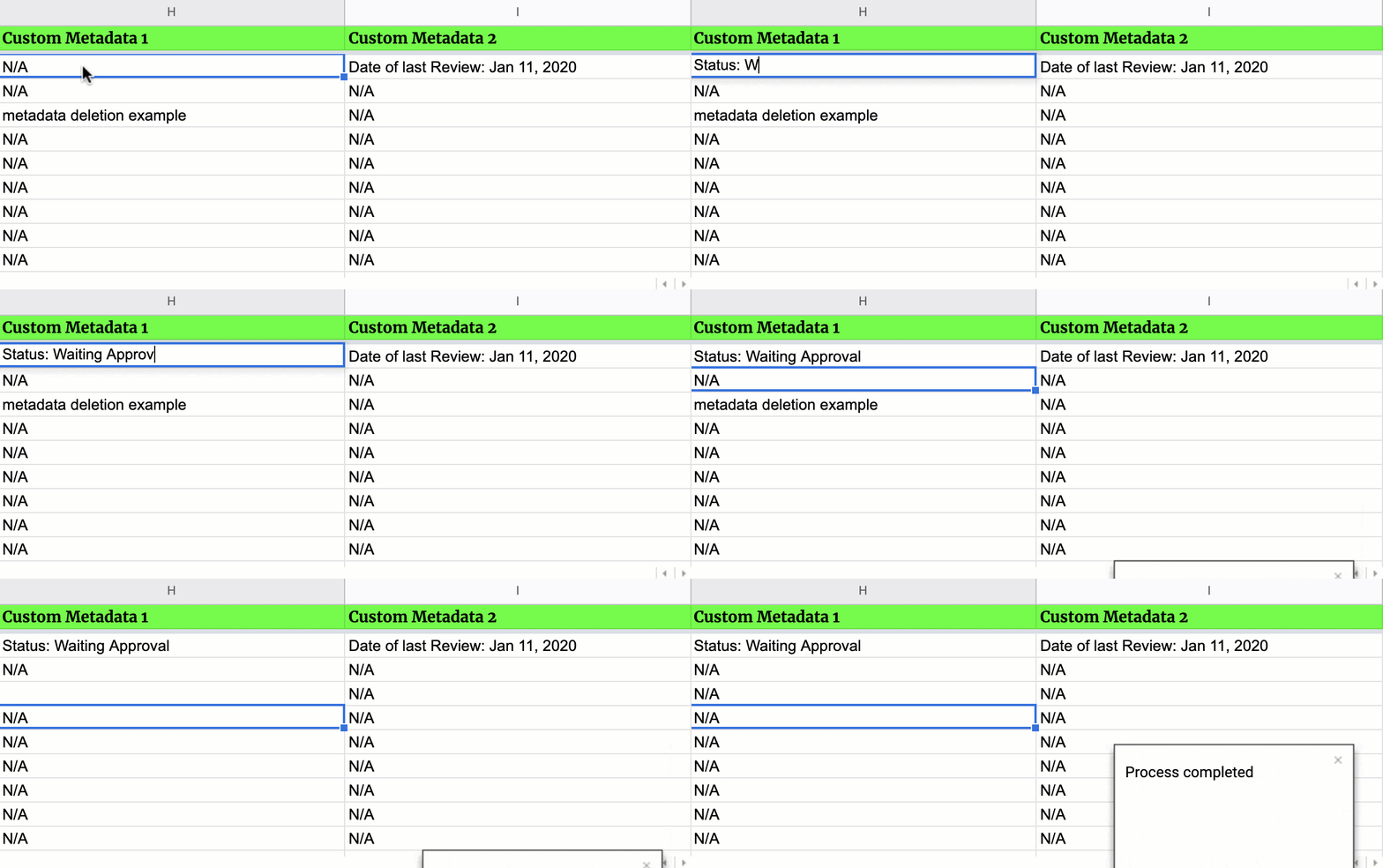
Tag files with custom metadata key-value properties
Attach custom organization tags and metadata to your Google Drive files (e.g. project codes, client IDs, review status) and query them anytime in Google Sheets.
See Drive Explorer in Action
Watch how easily you can export your Google Drive file catalog, inspect permissions, and automate background refresh in Google Sheets.
Try Our In-Browser Google Drive Tools
Need a quick solution without installing the add-on? Use our standalone browser tools for free with zero downloads required.
Start Free, Scale as Your Files Grow
Test Drive Explorer with up to 200 files for free. Upgrade whenever you need higher file capacity, Shared Drives support, or scheduled auto-refresh.
Free Tier
Ideal for trying out metadata exports, small audits, and basic renaming.
- List up to 200 files per export
- Recursive permissions & access audit
- In-sheet bulk file renaming
- All 30+ metadata fields available
- Direct download & export URLs
Standard
For power users and teams needing regular sync and Shared Drive support.
- Everything in Free tier, plus:
- List up to 30,000 files & folders
- Google Workspace Shared Drives support
- Daily automated background refresh
- 10GB image link cloud storage
Unlimited
For Workspace admins, MSPs, and enterprises managing massive file repositories.
- Everything in Standard, plus:
- Unlimited files & folders (no limits)
- Google Workspace Shared Drives support
- Hourly automated background refresh
- 20GB image link cloud storage
- Priority technical support
Looking for other options? We also offer Basic ($9/mo for 13k files) and Pro ($29/mo for 100k files), plus domain licenses. View all pricing plans →
Frequently Asked Questions
Everything you need to know about Drive Explorer, permissions audits, pricing tiers, and privacy.