Available YouTube™ Channel, Video & Playlist Metrics

TubeSheet Google Sheets Add-on
This guide is for the official TubeSheet add-on. Install it to keep track of YouTube video & channel metrics directly inside Google Sheets.
In total, you can list 25 different video metrics, 11 different channel metrics and 8 different playlist metrics with TubeSheet. By default, only 8 are fetched for videos, 8 for channels and 6 for playlists. To bring more metrics to the sheet, select Extensions → TubeSheet → Settings → Choose display fields. Check all the metrics you want and click on Save.
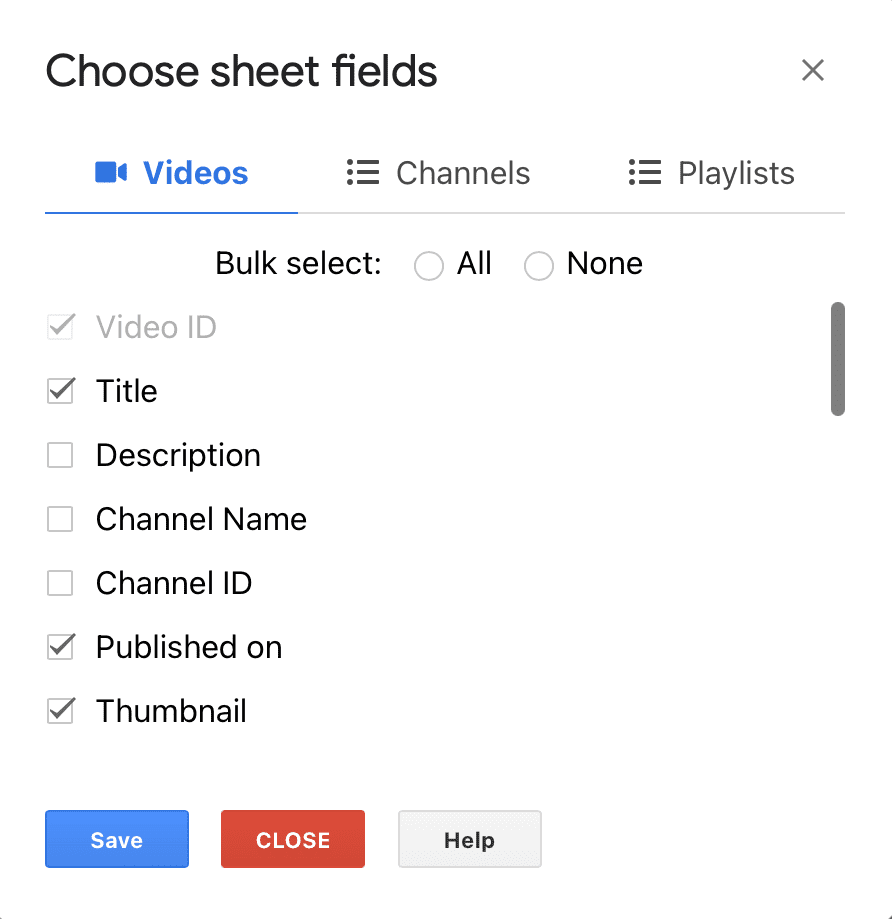
Available Video Metrics
- Title
- Description
- Channel Name
- Channel ID
- Published on
- Thumbnail
- Standard thumbnail URL
- Max Res thumbnail URL
- Medium thumbnail URL
- Default thumbnail URL
- High quality thumbnail URL
- Published at - No of days since December 30, 1899. You will see numbers in this column. Please custom format this column using Google Sheet™'s
Format → Numberfeature. - Duration
- Is Licensed
- Is Live now
- Live Viewers
- Live Start Time
- Live End Time
- Live Scheduled Start Time
- Live Scheduled End Time
- Caption Available
- Tags
- # of views
- # of likes
- # of dislikes
- # of comments
- Engagement Rate - Calculated by the formula - ((Likes + Comments) / Views) * 100.
Available Channel Metrics
- Title
- Description
- Published on
- Country
- Published at - No of days since December 30, 1899. You will see numbers in this column. Please custom format this column using Google Sheet™'s
Format → Numberfeature. - Thumbnail
- Medium thumbnail URL
- Default thumbnail URL
- High quality thumbnail URL
- Banner image
- Banner image URL
- # of videos
- # of views
- # of subscriber
Available playlist metrics
- Title
- Description
- Published at - No of days since December 30, 1899. You will see numbers in this column. Please custom format this column using Google Sheet™'s
Format → Numberfeature. - Thumbnail
- Published on
- Channel Title
- Channel ID
-
of videos

Ready to track YouTube metrics at spreadsheet speed?
Install TubeSheet from the Google Workspace Marketplace today and start automating YouTube video and channel analytics tracking directly inside Google Sheets.