Fetch Daily Stats for YouTube Videos and Channels

TubeSheet Google Sheets Add-on
This guide is for the official TubeSheet add-on. Install it to keep track of YouTube video & channel metrics directly inside Google Sheets.
With TubeSheet, you can easily monitor the daily performance of selected videos and channels. Simply choose the ones you want to track, and the tool will fetch their metrics automatically.
How it works:
- Open a video or channel sheet and highlight the IDs in the first column.
- Go to Extensions → TubeSheet → Daily Stats → Track Daily Stats.
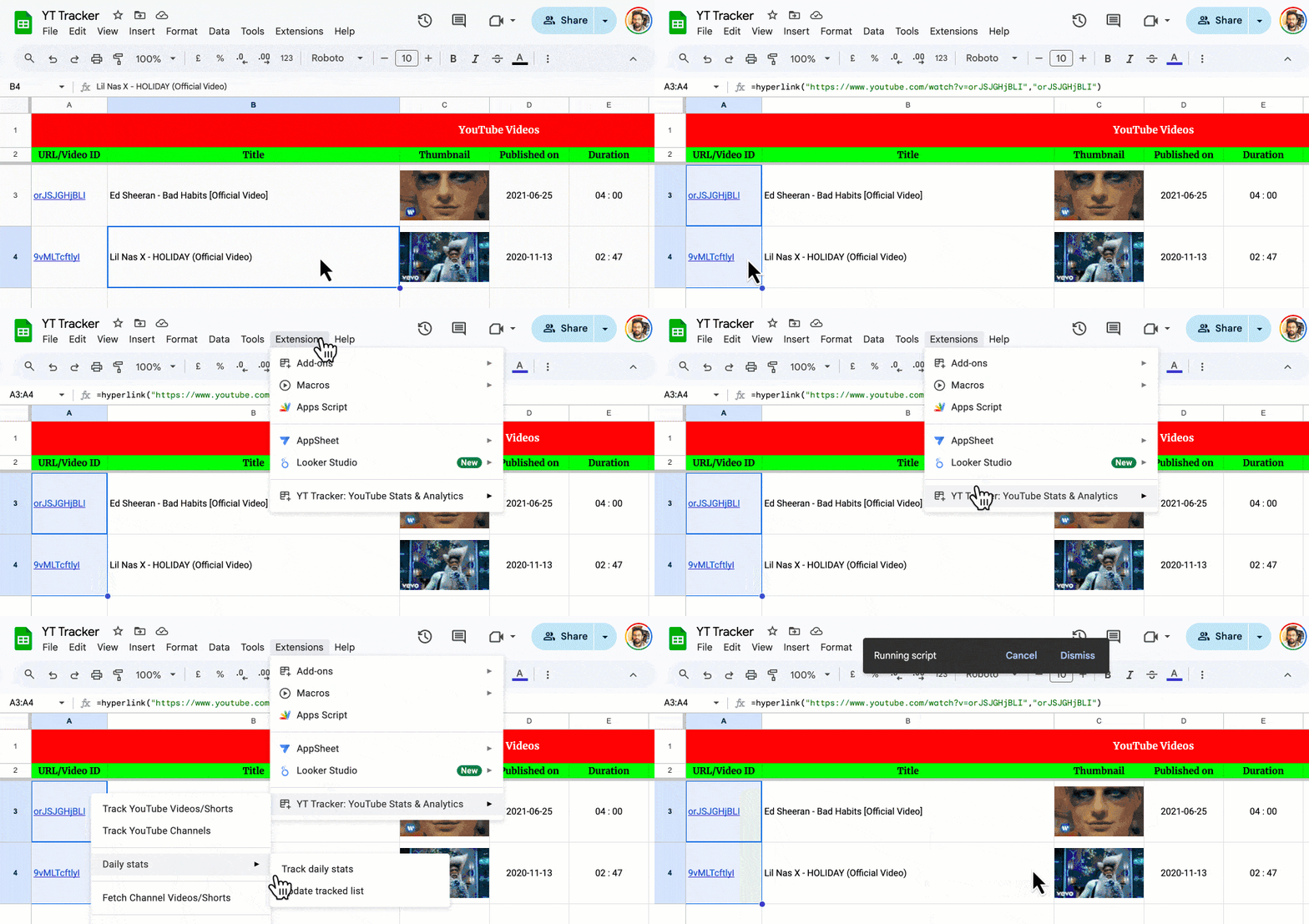
A new sheet will be created to track the selected metrics. This sheet updates once a day with the stats each video or channel accumulates for that day.

Change tracked videos/channels
To stop tracking one or more videos/channels, select Extensions → TubeSheet → Daily Stats → Update tracked list, select the channels & videos and click Remove selected.
This is a premium feature and requires you to have a premium license to use.

Ready to track YouTube metrics at spreadsheet speed?
Install TubeSheet from the Google Workspace Marketplace today and start automating YouTube video and channel analytics tracking directly inside Google Sheets.