Bulk Create Google Workspace Organizational Units

SheetOps Google Sheets Add-on
This guide is for the official SheetOps add-on. Install it to manage Google Workspace at spreadsheet speed.
Creating organizational units (OUs) individually in the Google Admin Console can be slow and tedious, especially during large-scale restructures. SheetOps lets you bulk import and create Google Workspace Organizational Units in a single operation, directly from your Google Sheet.
[!IMPORTANT] Workspace Architecture & Policy Enforcement: Organizational Units are hierarchical containers used to control settings, apps, and policies for your users. As Google's official best practices state, "Organizational units let you apply settings to a group of users or devices." SheetOps accelerates this process by letting you define and build your entire OU tree structure straight from your spreadsheet.
[!NOTE] Quick Answer: To bulk create Google Workspace Organizational Units with SheetOps: Go to Extensions → SheetOps → Org Units, enter the new OU paths and details in new rows, select the Apply Changes checkboxes, and confirm the creation by clicking Yes (Create) in the interactive dialog.
Understanding Bulk OU Creation in Google Workspace
SheetOps utilizes the Google Admin Directory API to insert new organizational unit records. You populate the sheet with your new OU details, select the Apply Changes option, and SheetOps executes the creations sequentially in the background, writing the results back to your sheet in real time.
Google Admin Console vs. GAM vs. SheetOps for OU Creation
While you can create OUs manually in the Google Admin Console or write terminal scripts using GAM, SheetOps provides a safer, faster way to manage creations at scale:
| Criteria | Admin Console | GAM CLI | SheetOps |
|---|---|---|---|
| Interface | Manual form inputs | Command Line | Google Sheets |
| Validation | Post-submit errors | None (scripting required) | Live Delta-Validation (Yellow Highlight) |
| Safety Net | None | High risk of batch errors | Confirmation dialog + Visual preview |
| Setup Time | Immediate (slow) | High (local installs) | Immediate (browser-based) |
Step-by-Step Guide to Bulk Creating OUs
1. Prepare Your Spreadsheet
Go to Extensions → SheetOps → Org Units. Selecting this automatically fetches and loads your existing Google Workspace OU hierarchy onto the spreadsheet, setting up the required columns, validation rules, and checkboxes.

2. Input Your New Organizational Unit Information
To create new OUs, add your data in new rows below the existing fetched units in the spreadsheet:
- Name (Required): The display name for the organizational unit (e.g.,
East Coast Sales). - Parent Path (Required): The path of the parent OU (e.g.,
/Salesor/). - Org Unit Path (Optional): The full hierarchical path of the new OU. Note: It is highly recommended to leave this empty when creating new OUs. SheetOps will automatically generate the correct Org Unit Path based on the Name and Parent Path you specify (e.g.,
/Sales/East Coast Sales). - Description (Optional): A short description of the organizational unit's purpose.
All cells with pending data will highlight yellow, waiting to be created.
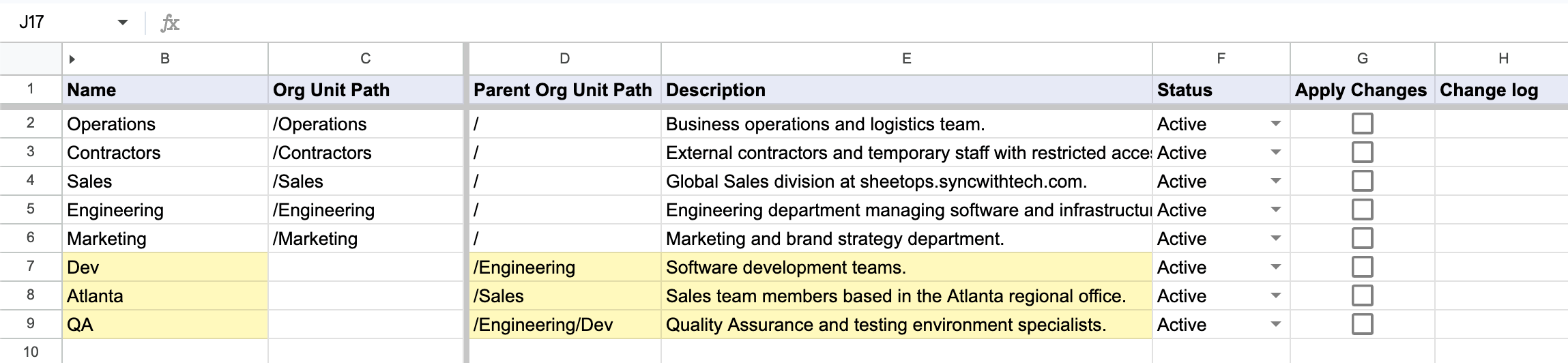
[!TIP] When you enter data, SheetOps automatically applies a yellow background to the edited cells. This visual indicator helps you keep track of pending changes before you push them.
3. Select Multiple Checkboxes at Once
Instead of checking every single box one by one, you can check many of them all at once!
- Click on a checkbox cell in the Apply Changes column.
- To select the other cells:
- Click and Drag: Hold your mouse button down and drag your cursor over the other checkboxes.
- Shift + Click: Press and hold the Shift key on your keyboard, then click the last checkbox cell in your list.
- Press the Spacebar on your keyboard to instantly check all the selected boxes at the same time.
4. Confirm the Creation in the Interactive Dialog
Once you press the Spacebar, an interactive dialog will pop up asking: "Do you want to CREATE new org units or UPDATE existing org units?" Select Yes (Create) to tell SheetOps to start creating your new OUs.
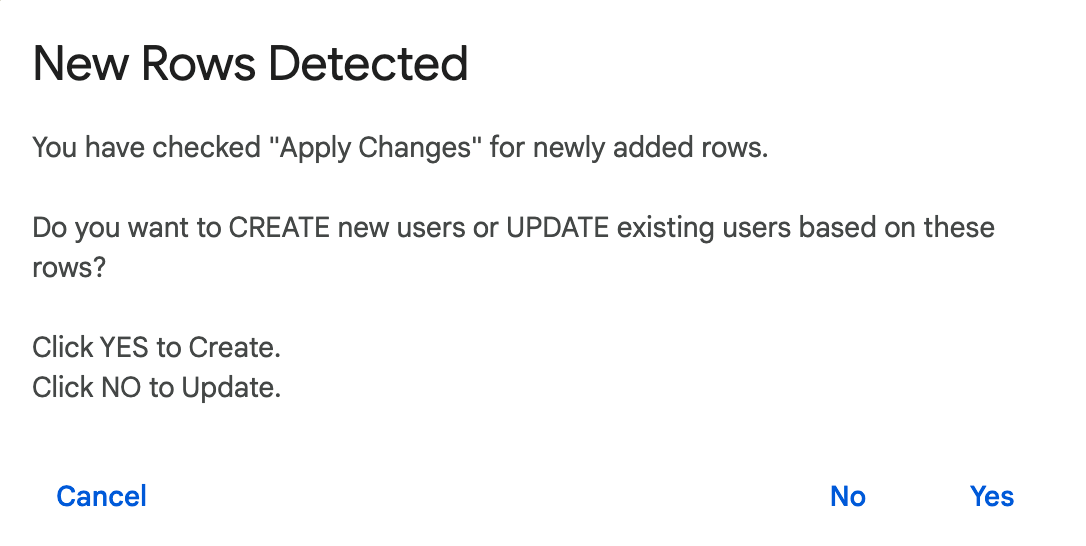
5. Review the API Result and Change Logs
As SheetOps goes to work creating the OUs in the background:
- The yellow highlights will disappear as each row is processed.
- The Change log column (the last column on the right) will show the status:
- ✓ Created (highlighted in light green) with a green checkmark when creation succeeds, along with the OU's new internal Google ID.
- ✗ error_message (highlighted in light red) if something goes wrong, explaining the error.
Troubleshooting & Best Practices
- API Mechanics: SheetOps utilizes the
insertmethod of the Google Admin SDK Directory API Orgunits resource to provision new organizational units. The account running the add-on must have super administrator privileges or a delegated admin role with write access for organizational units. - Sequential Creation: Google requires parent OUs to exist before creating child OUs. When creating nested paths (e.g.
/Salesand/Sales/Eastin the same batch), ensure the parent OU row is placed above the child OU row. SheetOps processes rows from top to bottom, ensuring the parent is created first. - Invalid Paths: All paths must begin with a forward slash
/. Do not include trailing slashes (e.g./Sales/is invalid; use/Sales). - Timeout Limitations: Google Apps Script execution limits apply (6-minute limit). We recommend running creations in batches of 100 to 200 rows at a time for optimal performance.
Frequently Asked Questions (FAQ)
What is the difference between Google Workspace Groups and Organizational Units?
Organizational Units (OUs) are policy-driven containers where you define service access, security settings, and app configurations for users (who can only belong to one OU). Groups are communication-driven lists (like mailing lists) where you assign resource access or send emails to users (who can belong to multiple groups).
Can I create nested Organizational Units in a single run?
Yes. You can create multiple levels of nested OUs in a single run by listing the parent OU in a row above the child OU. SheetOps will process and create the parent first, making it available when it reaches the child row.
What happens if the Org Unit Path already exists?
If you select Yes (Create) but the path already exists in your Google Workspace domain, the Directory API will return a conflict error, and the row will log a failure in the Change log.
Last updated: June 19, 2026

Ready to manage Workspace at spreadsheet speed?
Install SheetOps from the Google Workspace Marketplace today and start performing bulk directory updates, onboarding, and audits directly inside Google Sheets.