Bulk Update Chrome OS Asset IDs, Users, and Annotations

SheetOps Google Sheets Add-on
This guide is for the official SheetOps add-on. Install it to manage Google Workspace at spreadsheet speed.
Auditing physical device inventories, assigning hardware to new employees, or tagging barcode asset stickers in the Google Admin Console requires clicking into individual device records. SheetOps enables IT administrators and asset managers to bulk update Chrome OS Asset IDs, assigned user emails, campus locations, and notes directly from a Google Sheet with automated delta patching.
Understanding Chrome OS Device Metadata & Annotations
Google Workspace provides custom annotation fields on every enrolled Chrome OS device:
Asset ID(annotatedAssetId): Organization barcode number or asset tracking tag.User(annotatedUser): Email address of the primary student, teacher, or employee assigned to the laptop.Location(annotatedLocation): Building, campus, room number, or cart assignment.Notes(notes): Custom administrative notes (e.g., warranty repair history, insurance status).
SheetOps uses the Google Admin Directory API's patch endpoint to send only modified annotation cells, preventing accidental overwrites of existing device metadata.
Google Admin Console vs. GAM vs. SheetOps for Device Annotations
| Operational Feature | Admin Console UI | GAM CLI | SheetOps |
|---|---|---|---|
| Batch Input Method | Manual single-device editing | Command-line CSV batch loops | Direct spreadsheet cell editing & paste |
| Barcode Scanner Compatibility | Requires active cursor in single field | Must pre-format into raw CSV files | Scan barcodes directly into sheet cells |
| Update Safety (Delta Validation) | No visual preview of modifications | Blind overwrites if CSV headers mismatch | Changed cells highlight yellow before syncing |
| Partial Updates | N/A | Requires explicit flag filtering | Patches only modified annotation columns |
How to Bulk Update Chromebook Asset IDs & Metadata in Google Sheets
1. Export Existing Inventory or Open Blank Template
In Google Sheets, navigate to Extensions → SheetOps → Chrome OS Devices:
- Fetch with Filters: Export devices from a specific school building or cart OU.
- Just the Sheet: Create a blank template. Paste device serial numbers into the
Serial Numbercolumn.
2. Choose Display Fields & Enter Metadata
If the annotation columns are not already visible in your sheet:
- Go to Extensions → SheetOps → Choose display fields → Chrome OS devices to bring the required fields (Asset ID, User, Location, Notes) into your spreadsheet.
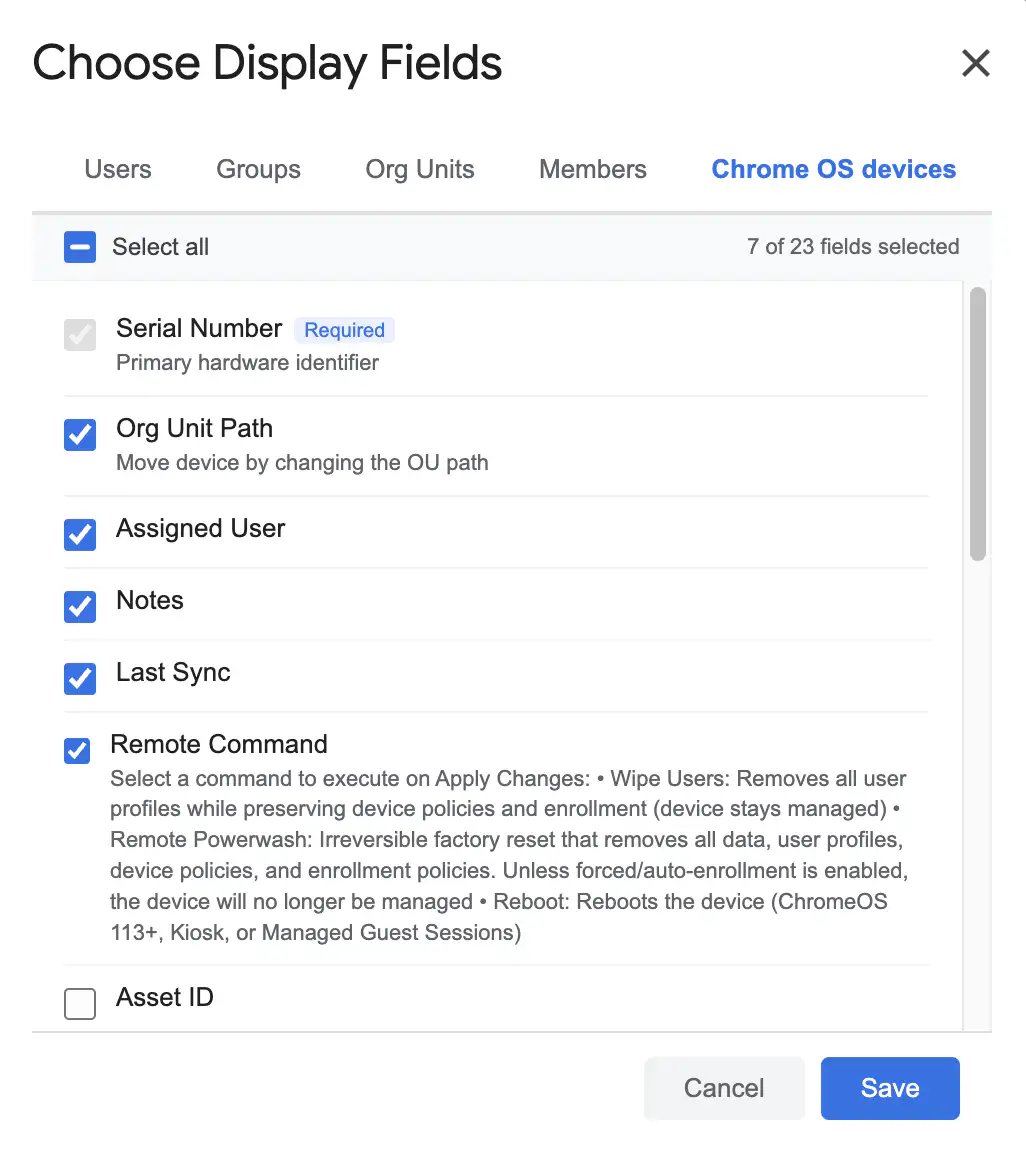
Populate the annotation columns in your spreadsheet:
- Asset ID: Scan physical barcode tags or paste inventory IDs.
- User: Enter the assigned user's email address.
- Location: Enter room, campus, or storage cart identifiers.
- Notes: Add any administrative or condition notes.
- Only cells you edit will highlight in pastel yellow.
3. Selecting Annotated Hardware Rows for Synchronization
Select the checkboxes in the Apply Changes column for all hardware rows you updated. Drag down across the rows or select the range and press Spacebar.
4. Verifying Patch Results in the Live Change Log
SheetOps sends non-destructive patch requests for all highlighted cells:
- Successfully patched cells clear their yellow background.
- The Change log column logs real-time API execution status:
- ✓ Updated with a green checkmark upon success.
- ✗ Error message if a device serial number cannot be located.
Best Practices for Fleet Inventory Audits
- 1:1 Device Checkouts: When issuing laptops at orientation, paste student rosters and scan barcode stickers directly into the
Asset IDandUsercolumns. - Cart Re-allocation: Filter devices by cart location, update the
Locationcolumn to the new classroom number, and sync changes in one batch. - Custom Display Fields: If you only need to update Asset IDs, use Extensions → SheetOps → Choose display fields → Chrome OS devices to hide unnecessary hardware telemetry columns.
Frequently Asked Questions (FAQ)
Does updating Asset IDs or notes affect device operation?
No. Annotations are administrative metadata stored in Google Workspace. Modifying Asset IDs, locations, or notes does not interrupt active user sessions or require device reboots.
Will SheetOps overwrite unedited fields with blank values?
No. SheetOps utilizes HTTP PATCH mechanics. Only fields that were explicitly modified (highlighted in yellow) are included in the update payload.
Can I search for devices by notes in SheetOps?
Yes. When using Fetch with Filters in the Chrome OS dialog, you can enter keywords in the Notes search field to isolate specific device batches.
Last updated: August 26, 2026

Ready to manage Workspace at spreadsheet speed?
Install SheetOps from the Google Workspace Marketplace today and start performing bulk directory updates, onboarding, and audits directly inside Google Sheets.